Quality & reports
Evidence for every build, ready when the build is
A finished print should not need an afternoon of screenshots to document. Euler gathers the summary, defect graphs, heatmaps, alerts and comments of every build on one page, and keeps the data for comparison later. The report is ready when the build is, so the paperwork does not hold up the parts.
Print Job Report
Watch case frames WF-12
November 3rd, 2026

Summary
| Print job name | Watch case frames WF-12 |
| Started at | Nov 3, 2026 07:13:31 |
| Total layers | 1107 |
| Device name | RenAM 500Q - Ti64 |
| Device type | Renishaw - RenAM 500Q |
| Critical alerts | 1 |
| Layer profile | Critical 7% Minor 2% Ok 91% |
Layer defects
- Obstruction
- Warpage
- Pinning
- Spatter
- Smoke
- Streaking
- Hopping
- Hole
The report
One page your QA can sign off on
The Report tab appears when a print has finished, and every report explains itself. It says which layers it covers, which defects it counts and the Model ID it was analyzed with.
The layer profile.
How much of the build was OK, minor, or critical.
| Defect class | Measure | Peak value | at | Mean per layer |
|---|---|---|---|---|
| Spatter | Count | 15 | layer 619 | 0.4 |
| Streaking | Count | 8 | layer 618 | 0.2 |
| Hopping | Count | 3 | layer 640 | 0.1 |
| Obstruction | Count | 2 | layer 617 | 0.0 |
A graph and a figure for each defect type.
Then heatmaps of the key defect types, and every alert and comment on the print.
- Use only defects on part
- Use critical layers only in heatmaps
- Optimize for black-and-white printing
- Show a separate graph for each defect type
Set the options once.
Your organization’s report defaults apply to every new report.
Narrow it down.
Limit a report to a layer range, or to the defects that sit on the parts.
Print it or save it as PDF.
The report is laid out for paper, with a black-and-white option for monochrome printers.
Emailed when the build finishes.
Members who want it get the report by email once the print is complete and analyzed.
Outlier analysis
Find the build that doesn't fit
An outlier analysis compares a group of prints and shows which ones stand apart from the rest, and for which defect types. Pick five or more prints of the same part, device or material. Add the result to a print's report with one click.
The group on one map.
Builds that behave alike sit together in a cluster. The ones worth a closer look sit further out.
- Flared bushing FB-10Spatter
- Flared bushing FB-07Spatter
- Typical8
- Slight0
- Moderate1
- Strong1
- Flared bushing FB-10Spatter
- Flared bushing FB-07Spatter
- Flared bushing FB-09
- Flared bushing FB-08
- Flared bushing FB-06
- Flared bushing FB-05
- Flared bushing FB-04
- Flared bushing FB-03
- Flared bushing FB-02
- Flared bushing FB-01
A deviation level for every print.
Typical, slight, moderate or strong, with the defect types that make a print different.
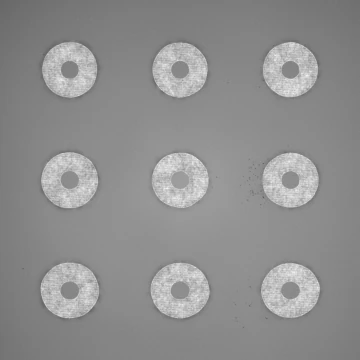
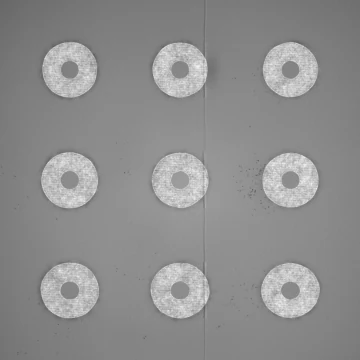
Then open the layers.
The same layer of a typical print and of the strong outlier. The outlier has spatter across the plate and a streak through it.
Send the print, not a folder of screenshots
Give a customer or a colleague a link to the print. Tag prints by part, material, customer or anything else, and find them again from the print jobs table.
Share as a link.
Open to anyone with the link, or only to members of your organization.
- Bracket BR-22Ti-6Al-4VRev CNordvik Robotics
- Bracket BR-21Ti-6Al-4VRev C
- Valve body VB-12IN718Qualification
- Heat sink HS-9AlSi10MgSolberg Power
- Watch case frames WF-12IN718Rev A
Tags and filters.
Filter the print jobs table by tag to line up every build of one part.
“Euler revealed a subtle design flaw that had previously gone unnoticed. We adjusted the design, resulting in a more consistent process.”
Documentation
In the docs
Every screen and every step, written for operators and process engineers.
More of the platform
- Live monitoringAlerts, device status and shop-floor dashboards.
- Print viewerEvery layer, every defect, in 2D and 3D.
- Euler ConnectStreams layers as they are saved. No new hardware.
- Integrations & AIAPI, webhooks, Slack, Teams, Claude and ChatGPT.
- Deployment & securityCloud, on-prem, air-gapped or AWS GovCloud.
Ready to try it on your next build?
Free to start, with the data you already have. Connect a printer or upload a finished build.