The platform
Everything a build needs, from the first layer to the sign-off
Euler is one place for live monitoring, defect review, reporting and comparison. Every part of it reads the same layer images and the same results, so there is one account of every print. Bad builds are caught while they run and reports are ready when they finish, so parts ship sooner.
A critical defect has been detected, beginning on layer 617. Review the layer images and acknowledge or dismiss the alert.
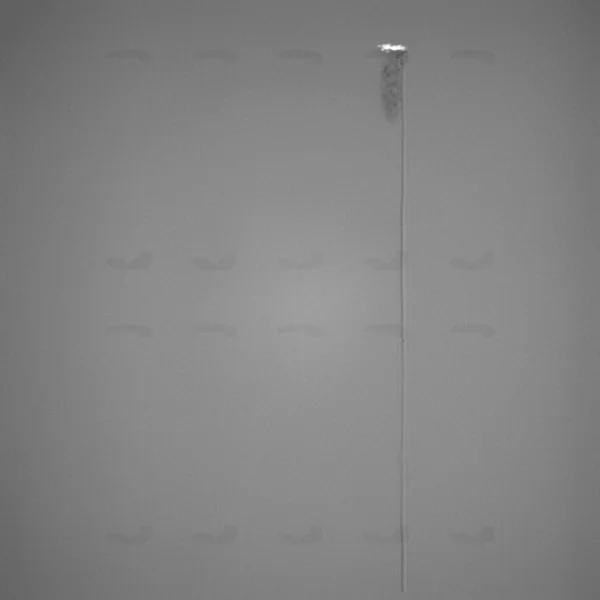
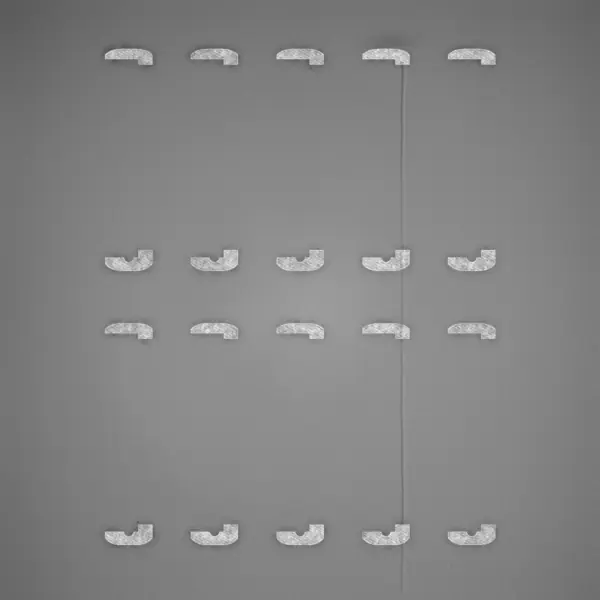
- JBJonas Berg on layer 604Corner of this frame is starting to curlNov 3
- ALAnna Lind on layer 617The recoater hit it here and the blade is notchedNov 3
- JBJonas Berg on layer 640Matches what we picked up in CT. Voids in the frame behind it, layers 617 to 691.
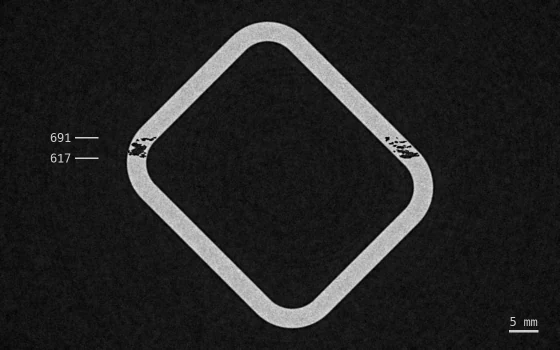 Nov 10
- Live monitoringAlerts, device status and shop-floor dashboards.
- Print viewerEvery layer, every defect, in 2D and 3D.
- Quality & reportsBuild reports, outlier analysis and sharing.
- Euler ConnectStreams layers as they are saved. No new hardware.
- Integrations & AIAPI, webhooks, Slack, Teams, Claude and ChatGPT.
- Deployment & securityCloud, on-prem, air-gapped or AWS GovCloud.
Live monitoring
Alerts while the build is still running
Euler checks every layer as it arrives and raises a critical alert when a defect could cost you the build. One tap opens the exact layer.
- Critical alerts by email, Slack and Teams, with a link to the layer
- Every device’s state at a glance: healthy, defect, offline
- Shop-floor dashboards on any screen

| Detail | Value |
|---|---|
| Print job | Watch case frames WF-12 |
| Layer | 617 |
| Detected at | Nov 3, 14:32 |
| Job started | Nov 3, 07:13 |
Print viewer
Every layer, every defect, in 2D and 3D
Step through a thousand layers without waiting. Defects are marked where they happened, so a glance tells you what you are looking at.
- Recoat and exposure images side by side
- Eight defect types marked on the image, each with its own color
- 3D heatmaps show where defects cluster inside the part
Quality & reports
Evidence your customer and your QA can read
When a build finishes, its report is ready: print it, save it as PDF or send a link. Compare builds of the same part over time.
- A one-page report with summary, graphs, heatmaps, alerts and comments
- Outlier analysis finds the build that doesn’t fit the group
- Share a print with your organization, or with anyone who has the link
Euler Connect
No new hardware, nothing touching the process
Your printer already photographs every layer. Euler Connect picks those images up and sends them to Euler as they are saved.
- Runs on any machine with access to the images and sends each layer as it is written
- Keeps layers through network drops and reconnects on its own
- 38 printer models from 15 manufacturers
Integrations & AI
Fits into the tools you already run
Pull Euler’s results into your own systems, embed prints in your own pages, or connect an AI assistant and ask it what happened on last week’s builds.
- Ask Claude or ChatGPT about your builds in plain language
- REST API, webhooks and signed links for your MES, QMS or data lake
- Slack and Teams alerts, email notifications
Read from EulerThree builds had more spatter per layer than the rest. The turbine bracket had about twice the average.
- Turbine bracket TB-42.1×
- Pump housing PH-61.4×
- Heat exchanger HX-21.2×
EulerDeployment & security
Cloud, on-prem, air-gapped or AWS GovCloud
The same Euler runs wherever your data is allowed to be. Defense and export-controlled teams get the same viewer, alerts and reports, and their build data never leaves their environment.
- Export-controlled programs
- Site admin creates and manages accounts
- Notifications through your own email server
- Updates on your schedule
FAQ
Before you connect a printer
Ready to try it on your next build?
Free to start, with the data you already have. Connect a printer or upload a finished build.